Legal & Terms
Flexible terms & conditions setup with built‐in protection.
In this page
December 5th, 2025
Overview
Terms & Conditions
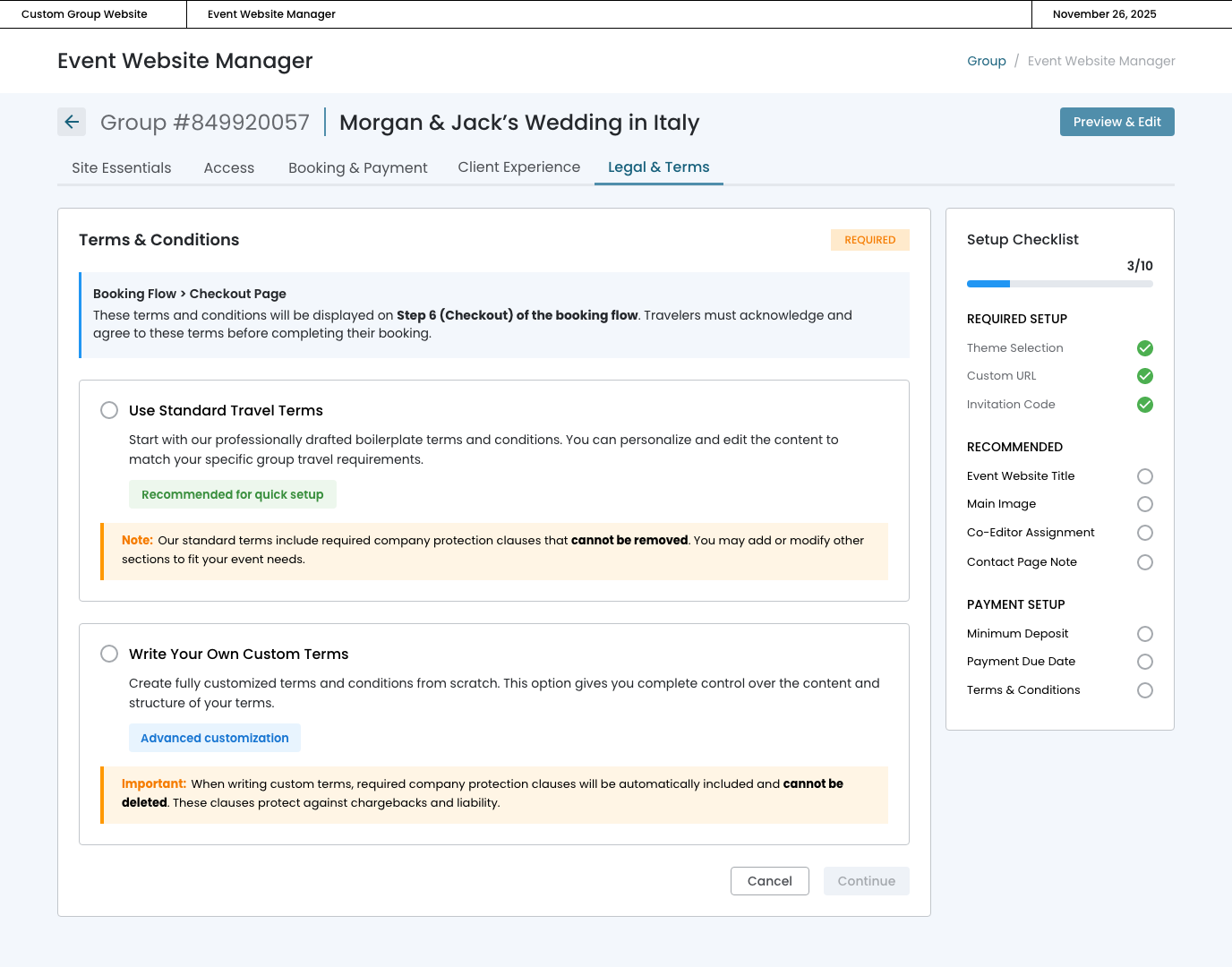
The Terms & Conditions setup gives travel advisors two clear paths with our required company protection clauses automatically included and locked, ensuring every event website has the legal safeguards we need to prevent chargebacks.
Information Hierarchy:
The blue information box at the top immediately orients advisors by explaining:
- WHERE the terms appear (Step 6 - Checkout)
- Allows full editing and personalization to match specific event requirements
- WHAT travelers must do (acknowledge and agree before booking)
Warning Note Strategy:
Each option includes a colored warning note (orange/yellow background) that:
- Uses "Note" vs "Important" language matching the option's complexity
- Explicitly states protection clauses "cannot be removed"
- Sets expectations BEFORE advisors enter the editor
December 5th, 2025
Dual‐Path Approach
OPTION 1: Use Standard Travel Terms
- Provides professionally drafted boilerplate terms covering all essential policies
- Allows full editing and personalization to match specific event requirements
- Gives advisors confidence they're starting with legally sound content

OPTION 2: Write Your Own Custom Terms
- Offers complete creative control for experienced advisors with existing terms
- Maintains company protection through required clauses
- Tagged as "Advanced customization" to set appropriate expectations

December 5th, 2025
Workflow: Standard Travel Terms
Critical Protection Mechanism
We need to protect the company from chargebacks and liability claims, but we're giving advisors the ability to write or edit terms and conditions. How do we ensure every single event website includes our required protection language without advisors accidentally deleting it, modifying it, or ignoring it entirely?
The Solution: Locked Company Protection Clause
Implementation Strategy
A visually distinct, non-editable section within the text editor that:
- ALWAYS VISIBLE
The Company Protection Clause appears directly in the editor, not hidden or added behind the scenes. Advisors see exactly what travelers will see during checkout. - CLEARLY LOCKED
Visual indicators make it impossible to miss: - Lock icon in the header
- Bold title: "Company Protection Clause (Required ‐ Cannot be Edited)"
- Different background color (light gray) to distinguish from editable content
- PROACTIVE WARNING AT TOP
Before advisors even start editing, a yellow warning banner explains: "Protected Content: The 'Company Protection Clause' section at the bottom cannot be edited or removed. This content protects against chargebacks and ensures compliance with payment processing requirements."
In Progress State

Complete State
- Preview/Summary ‐ User can see the terms they saved
- Complete badge ‐ Clear indication it's complete
- Edit Terms ‐ button to go back to the text editor
- Protected clause reminder ‐ Shows the lock icon with text confirming company clause is included
- Checklist updates ‐ "Terms & Conditions" gets checkmarked
